Discovered
Hosts and version-detected services arrive in the workspace as scans finish. Focus expands the map; Arrange resets the layout.
Hayduk is a free, open-source client for the Metasploit Framework and a browser-based Armitage alternative. Map hosts, services, modules, and live sessions in one tab.
One Go binary for Linux, macOS, and Windows. No Java, Node, or Go runtime needed.
Network map
msfrpcd connected
meridian-web
Linux Ubuntu 22.04
10.24.8.21
Illustrative campaign data. Select a host to inspect it.
Hayduk is a browser-based Metasploit GUI built around the campaign, not a single console. It gives the engagement a surface, so the next move is visible instead of buried in a scrollback.
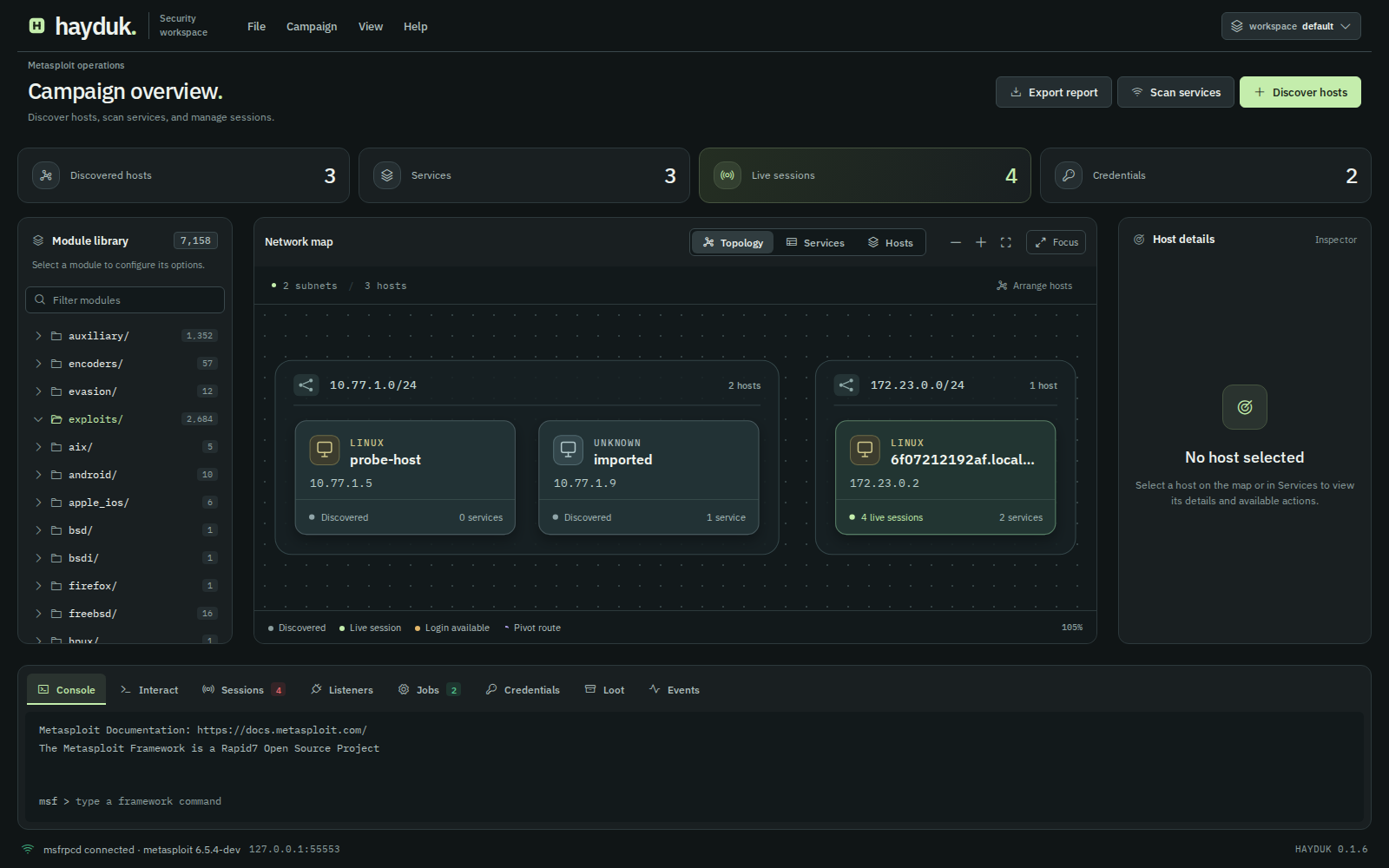
The network map groups hosts by subnet. Sessions, routes, and credentials appear where they belong. Every host, row, and module keeps its action menu.

Hayduk's Metasploit GUI campaign overview. Interface shown with illustrative campaign data.
Hosts and version-detected services arrive in the workspace as scans finish. Focus expands the map; Arrange resets the layout.
Meterpreter and shell sessions stay attached and visible. Choose one and its console opens without leaving the map.
Recovered credentials sit against the hosts and services they unlock, ready for a login workflow or a later review.
When a session reaches another network, the map draws the route and invites the next subnet onto the board.
Hayduk carries forward the graphical Metasploit workflow that Armitage established, as a separate implementation with a browser UI and one binary. If you are looking for an Armitage alternative, the map, module tree, and session controls will feel familiar; unlike the Java desktop client, Hayduk runs in a browser and needs no Java runtime. Metasploit itself is not bundled; Hayduk connects to it through go-msf.
The workflow follows the engagement, not a feature list. Find the network, learn what is running, choose a way in, stay in the session, and leave with something the client can open.
Give Hayduk an address or CIDR and choose a scanner from your Metasploit build. Hosts arrive in the active workspace as discovery finishes.
Version detection runs db_nmap, fingerprints service names and versions, and imports them into the workspace. Clear it to fall back to a portscan module.
| Host | Port | Service | Version |
|---|---|---|---|
| meridian-web | 22/tcp | ssh | OpenSSH 8.9 |
| meridian-web | 443/tcp | https | nginx 1.24 |
| build-runner | 8080/tcp | http | Jenkins 2.4 |
| fileserver | 445/tcp | smb | Samba 4.15 |
Version detection needs nmap and a connected database on the Metasploit host.
Browse the module catalogue by path. Ranks, options, and payloads sit in the same panel. Find attacks prefills a matching host and port; a right-click gets you there too.
No module matches that filter. Try a service, a platform, or a path.
Sample paths from a standard Metasploit install.
Meterpreter and shell consoles open in Interact. Work across workspaces, keep several sessions live, and upgrade a shell when the path is there.
Canned commands. Nothing here connects to a target.
Export a self-contained HTML report for the active workspace: hosts, services, sessions, credentials, loot, and the event log. It opens on a laptop that has never run Hayduk.
campaign-alpha.html
Includes the event log, loot, and every service record from the workspace.
Campaign data across this page is illustrative.
Run Hayduk for a team on a trusted network, or export the workspace for someone who was not there. Both views come from the same campaign.
Start the binary with a team flag and a reachable address. Operators open the same token URL, choose a name, and see the same hosts, sessions, and event log.
./hayduk --team --listen 192.168.1.10:8787Use the interface address your operators can reach. Wildcard addresses are refused.
Team mode uses one shared token over plain HTTP. Operator names are labels, not verified identities. Use it on networks you trust, and treat the token URL like a password. Read the security policy.
| Host | Address | Access | Services |
|---|---|---|---|
| meridian-web | 10.24.8.21 | Session | 22, 443 |
| build-runner | 10.24.8.42 | Session | 22, 8080 |
| fileserver | 10.24.8.56 | Credentials | 21, 445 |
| atlas-dc | 10.24.8.10 | None | 53, 88, 389 |
Hayduk is a free, open-source Metasploit GUI for the browser. It turns a Metasploit Framework instance into a campaign map: hosts, services, modules, sessions, and reports in one tab.
If you are looking for a Metasploit web interface or an Armitage alternative, these are the questions operators ask first.
Detailed setup lives in the Hayduk README. For bugs and questions, open an issue on GitHub.
Hayduk is a free, open-source Metasploit GUI that runs in the browser. It connects to a Metasploit Framework instance through msfrpcd and turns the campaign into one view: hosts, services, modules, live sessions, and a report you can hand over. It is MIT licensed and ships as a single Go binary.
Yes. Hayduk follows the graphical Metasploit workflow that Armitage established: hosts on a map, modules in a tree, and sessions in reach. The practical difference is delivery. Armitage is a Java desktop application; Hayduk runs in the browser as one Go binary. It is a separate implementation and does not bundle Metasploit.
No. Hayduk is a client for Metasploit Framework, not a Metasploit distribution. It talks to the msfrpcd service on an instance you run; that instance performs the scanning, exploitation, and session work. If you need a disposable Metasploit setup, the repository includes a Docker lab with Metasploit and optional targets.
Yes. Release archives cover Linux (including Kali Linux and Ubuntu), macOS, and Windows. The release binary includes the browser UI, so no Java, Node.js, or Go runtime is required. You also need a reachable Metasploit Framework instance running msfrpcd; workspace features need Metasploit's database connected, and version detection needs nmap on the Metasploit host. See the Hayduk setup steps.
Hayduk uses Metasploit's RPC service, msfrpcd. Start msfrpcd on the Metasploit host, then enter its host, port, user, password, and SSL setting in the connect dialog. A local default is 127.0.0.1, port 55553, user msf, with SSL off.
Yes, with team mode. Start Hayduk with --team on a reachable address and share the token URL; each operator picks a name and works on the same hosts, sessions, and event log. Team mode uses one shared token over plain HTTP, so keep it on a trusted network and treat the URL like a password. The security policy explains the trust model.
A self-contained HTML campaign report scoped to the active workspace. It includes hosts, services, sessions, credentials, loot, and the event log. The report opens offline, without Hayduk, Metasploit, or a network connection. See the example report.
Use Hayduk only on systems you own or have written permission to test. For a self-contained practice environment, the repository includes a Docker lab with Metasploit, a database, and optional vulnerable targets. It is the fastest way to walk through discovery, scanning, sessions, and the report.
Hayduk is a Metasploit GUI, not a Metasploit distribution. It connects to the msfrpcd you already run, serves the UI itself, and opens a tab. No installer, no Java, no separate frontend.
Latest release v0.1.6. Free and open source under the MIT license.
Release binaries run on Linux (including Kali Linux and Ubuntu), macOS, and Windows. Go and Node are only needed to build from source.
msfrpcd -P 'yourpassword' -S -f -a 127.0.0.1 -p 55553Keep this terminal open. -S disables SSL for a local connection.
./haydukOn Kali Linux and Ubuntu, run it from the extracted folder. On Windows PowerShell, use .\hayduk.exe. The UI opens with a token in the URL.
Workspace features also need Metasploit's database connected.
The repository includes a disposable Docker lab with a database and optional vulnerable targets. Connect with the same host and port.
Read the lab stepsscripts/msf/up.sh --with-vulnbox